Te rapu i ngā whakahaerenga wīra kua whakamatihikotia
Searching digitised probates
Probate files are one of the most popular collections we hold. Probates give information on how a person’s estate was administered after their death and most probates include information on both the deceased and their family. If the deceased’s will was submitted to the courts, it will be included in their probate file.
Searching digitised probates
Our probate files have been digitised as part of a joint project between Archives New Zealand and FamilySearch. In time, all probate files over 50 years old will be made available online, free of charge, for searching, viewing, and printing, via the FamilySearch website.
To search for digitised probate records, visit FamilySearch's probate search page.
Enter the name of the person you are researching. When you find a match, click on the name. This will expand the information.
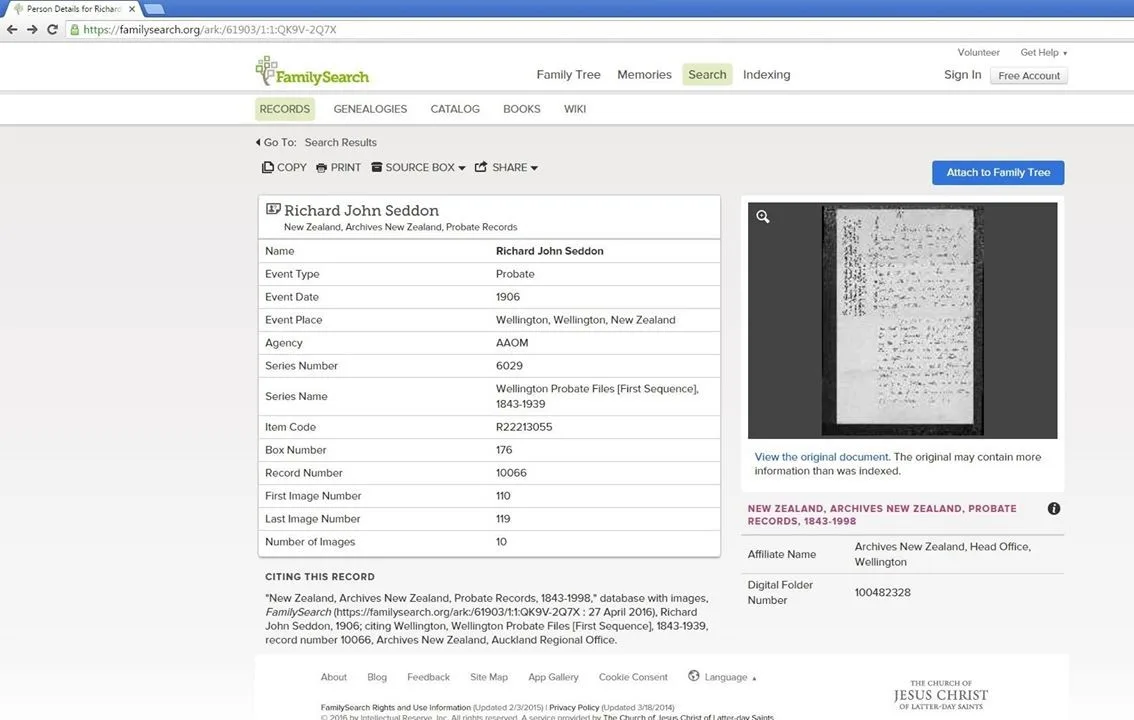
On the left side of the expanded information is a reference to the 'First Image Number' and the 'Last Image Number'. FamilySearch uploads images in batches each including multiple records. The first and last image numbers tell you where in the batch a probate begins and ends. On the right is an image from the probate. Below the image is a link 'View the original document'. Click on this link to begin viewing images of the probate.
Can’t find the probate you are looking for?
Only probates filed more than 50 years ago can be viewed online. If you are seeking a probate that is less than 50 years old please contact us. Access through our reading rooms and enquiry services remains unrestricted.
If the file is more than 50 years and you can’t find it using the name search, there may be two reasons:
The probate hasn’t been made available online yet (some Auckland probates are still to be digitised). You will need to contact us to access the record.
The probate isn’t indexed by name yet but can be browsed by Court and record number.
Searching unindexed probates
Some probate files have been uploaded to FamilySearch but are yet to be indexed, meaning that they are not searchable by name. Follow these steps to find unindexed probates:
Obtain the record number and year from our collections search tool, making a note of the Court e.g. Auckland. The record number may be in the format P712/1927.
Go to the FamilySearch website.
Scroll down and click on ‘Browse through...images’.
Click on the Court e.g. Auckland
The probates are currently filed by their year and record number. Scroll down to the year of the probate you want (1927 in this example), and then select the range that includes the ‘rec’ number from Collections search (712 in this example).
Scroll through the images to find the probate you want. You may wish to guess the approximate position from the file number range, and enter that into the image number box at the top of the screen.